Starting or upgrading a small business in Sri Lanka requires careful financial planning. Between purchasing inventory, paying shop rent, arranging utilities, and managing daily expenses, investing in an expensive Point of Sale (POS) system may not be practical, especially during the early stages of business.
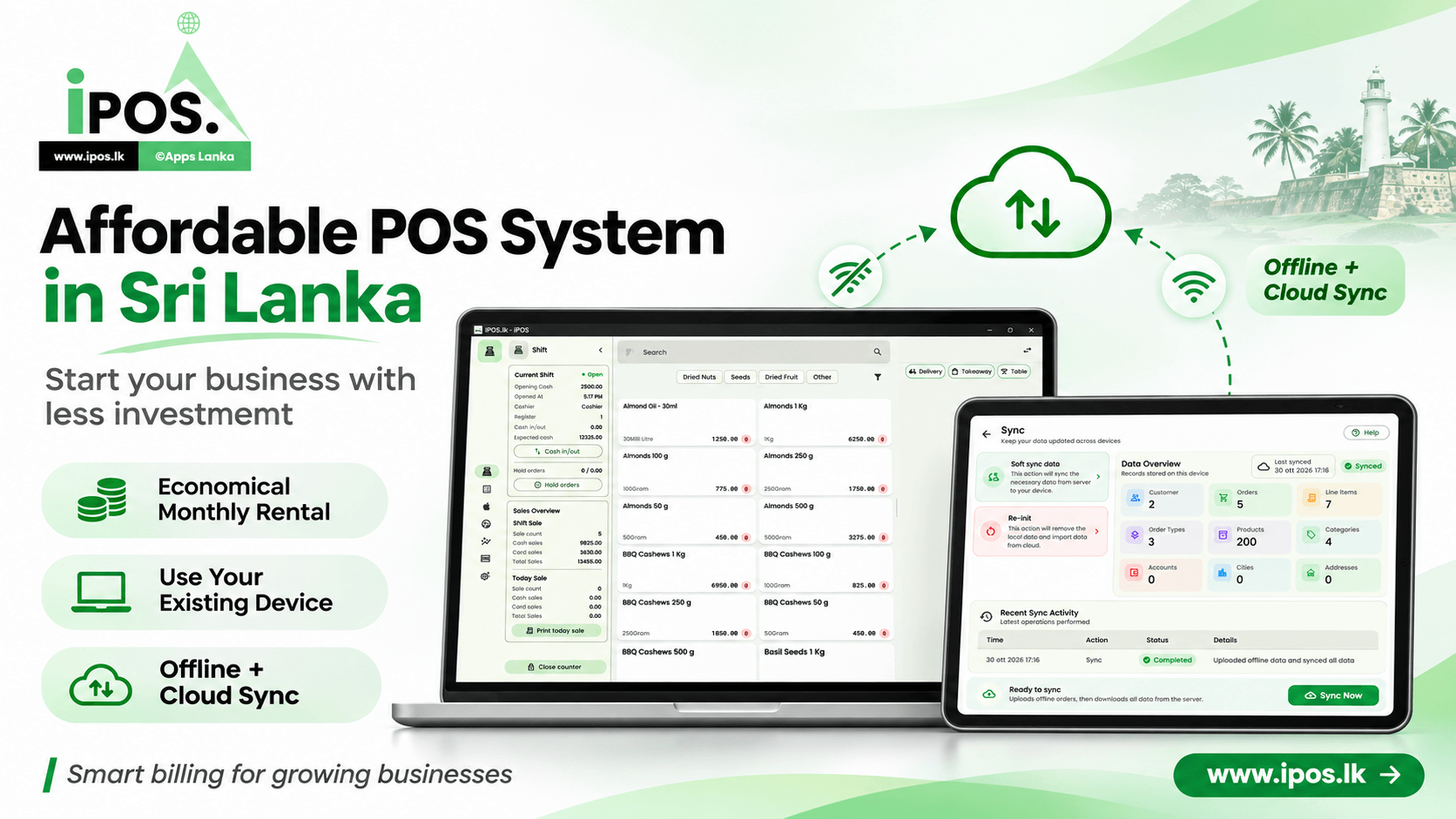
Fortunately, modern POS technology no longer requires every business to purchase dedicated computers, expensive receipt printers, and costly software licences. With iPOS, developed by Apps Lanka Software Solutions, businesses can reduce their initial investment through affordable monthly subscriptions, compatible existing devices, offline billing capabilities, and flexible receipt options.
Key takeaways
- iPOS offers an economical monthly rental model that reduces the need for a large upfront software investment.
- Businesses can use compatible smartphones, tablets, or existing Windows laptops instead of purchasing dedicated POS hardware.
- Offline POS functionality with cloud synchronization helps maintain sales operations during temporary internet interruptions.
- Affordable 58mm and 80mm receipt printers are available, while digital receipts can eliminate the need for printing in suitable situations.
- A flexible POS setup allows small businesses to start with essential equipment and expand as their requirements grow.
Why Traditional POS Systems Can Be Expensive for Small Businesses
Many small business owners in Sri Lanka still associate POS systems with expensive equipment and complicated installations. A traditional setup may involve a dedicated computer, touchscreen monitor, barcode scanner, cash drawer, receipt printer, and software licence.
Although these components can be useful, purchasing everything at once may create unnecessary financial pressure for a newly established business.
The Real Cost of Starting a Retail Business
Consider a small clothing shop opening in Jaffna. Before selling its first product, the owner may need to invest in shop rental, shelving, inventory, packaging, signage, and marketing.
Adding an expensive POS installation to these costs reduces the money available for purchasing products and attracting customers.
For many businesses, the better approach is to identify which POS features are essential from the beginning and which hardware accessories can be introduced later.
A practical starting point: Your first POS setup does not need to include every available accessory. A compatible device, reliable POS software, and a suitable method of providing receipts may be enough for your initial operations.
Affordable Monthly POS Rental: Pay for What Your Business Needs
One of the main advantages of iPOS is its economical monthly subscription approach. Instead of requiring a large initial software purchase, businesses can access POS functionality through recurring payments.
This model can be particularly useful for startups, small retailers, and businesses that prefer to manage technology expenses as part of their regular operating budget.
What Features Does iPOS Offer?
Depending on the selected subscription and application configuration, iPOS supports essential POS and business management functionality, including:
- Sales and billing: Process transactions and manage daily sales activities.
- Product management: Maintain product information, categories, and selling prices.
- Inventory management: Monitor stock availability and product movements.
- Cashier operations: Manage sales shifts and review transaction activity.
- Sales reporting: Review business performance using available reports.
- Offline operations: Continue supported sales activities when the internet connection is unavailable.
- Cloud synchronization: Synchronize locally stored information with the server when connectivity becomes available.
Rather than selecting a POS system based only on its price, business owners should evaluate whether the software supports their actual daily workflow.
A low-cost system becomes valuable when it reduces manual work, improves transaction accuracy, and provides the information needed to manage business operations efficiently.
Why Monthly Subscriptions Can Be Better for Startups
A monthly payment structure can help businesses preserve their working capital. Instead of allocating a large amount to software during the initial setup, owners can distribute that expense across regular operating periods.
However, it is important to compare the complete cost of ownership, including subscription fees, optional hardware, additional services, and future expansion requirements.
Use Your Existing Smartphone, Tablet, or Windows Laptop as a POS
Purchasing a dedicated POS terminal is not always necessary. Many business owners already have devices that can support modern POS applications.
iPOS provides flexible device options, helping businesses make better use of equipment they already own.
Android Smartphones for Small Businesses
A compatible Android smartphone can provide a convenient entry point for mobile POS operations. This approach is especially useful for businesses with limited counter space or a relatively small number of daily transactions.
For example, a small retail seller or market stall operator may prefer using a smartphone instead of maintaining a dedicated computer.
Tablets for Comfortable Touchscreen Billing
Tablets offer a larger screen than smartphones and can make product selection and billing more comfortable. They may be suitable for clothing shops, small grocery stores, cafés, and other retail environments.
A tablet-based POS setup can also help maintain a clean and organized sales counter without requiring a traditional desktop computer.
Existing Windows 10 Laptops
Businesses that already own a compatible Windows 10 laptop may be able to use it as their POS terminal. This avoids purchasing another computer solely for billing purposes.
Before installation, the device should be checked for application compatibility, available storage, and supported peripherals. Businesses should also consider operating system security and maintenance, particularly because standard Windows 10 support ended in October 2025.
Comparing POS Device Options
| Device | Advantages | Best suited for | Investment consideration |
|---|---|---|---|
| Android smartphone | Portable, compact, and convenient | Small shops, mobile sellers, startups | Potentially no new hardware purchase |
| Tablet | Larger touchscreen and comfortable navigation | Retail stores, cafés, boutiques | Use an existing tablet or purchase an affordable compatible model |
| Windows laptop | Keyboard support and larger working area | Retail counters and established shops | Reuse an existing compatible laptop |
| Dedicated POS terminal | Purpose-built counter installation | Businesses requiring specialized hardware | Higher potential initial hardware investment |
Tip: Before purchasing new POS equipment, check whether your existing smartphone, tablet, or laptop is compatible with iPOS. Reusing equipment can be one of the easiest ways to reduce startup costs.
Offline POS with Cloud Sync: Keep Your Business Running
Reliable internet access is important for modern business applications, but connectivity can occasionally be interrupted. For a retailer, losing internet access during a busy sales period can create delays and inconvenience.
That is why offline functionality is an important consideration when choosing POS software in Sri Lanka.
How iPOS Offline Synchronization Works
iPOS supports an offline-first approach for configured sales operations. Rather than depending entirely on a continuous connection to the server, supported transactions can be recorded locally on the device.
When internet connectivity becomes available, the application can synchronize locally stored information with the cloud.
- Start your sales session. Open iPOS on a configured device with the necessary business information available locally.
- Process supported transactions. Continue billing operations even when the internet connection is temporarily unavailable.
- Store transaction information locally. Offline sales data remains on the device until it can be synchronized.
- Reconnect to the internet. Once connectivity returns, initiate or complete the supported synchronization process.
- Verify synchronization status. Review the application status and recent activity to confirm that transactions have been successfully synchronized.
Why Offline and Cloud Functionality Matter
Offline operation can help maintain business continuity, while cloud synchronization supports data sharing and centralized business management.
This combination is particularly useful for businesses that want the convenience of cloud technology without making every transaction entirely dependent on internet connectivity.
Offline features, synchronization timing, and data availability depend on the configured iPOS application and business workflow. Businesses using multiple devices should understand how synchronization and conflict handling operate.
Reduce Receipt Printing Costs with Flexible Options
Receipt printing is another area where small businesses can manage their initial investment. Although many retailers prefer printed receipts, purchasing an expensive printer is not always necessary.
iPOS supports different receipt approaches based on business requirements and compatible equipment.
58mm Bluetooth Thermal Receipt Printers
A compact 58mm thermal printer can be a cost-effective choice for businesses that print relatively simple receipts.
These printers are generally small, take up limited counter space, and use thermal paper rather than ink cartridges.
For small retailers with basic receipt requirements, a compatible 58mm Bluetooth printer may provide the functionality they need without the expense of a larger printing setup.
80mm Thermal Receipt Printers
An 80mm receipt printer provides more printing width, making it suitable for receipts containing longer product descriptions, additional transaction details, or larger item lists.
Businesses processing many products per transaction may find wider receipts easier for customers to read.
The appropriate printer depends on receipt layout, connection method, operating system, and the specific model supported by iPOS.
Email Receipts Without Purchasing a Printer
For businesses that can provide digital receipts, email delivery offers another way to reduce initial expenses.
Instead of printing every invoice or receipt, the business can send the document to the customer's email address using supported iPOS functionality.
Digital receipt delivery can provide several practical benefits:
- No physical printer is required for transactions handled entirely through email.
- Businesses can reduce thermal paper consumption.
- Customers can retain their transaction records electronically.
- Receipts can be easier to retrieve when customers need them later.
- Businesses can introduce physical printing when transaction volumes or customer preferences make it necessary.
Comparing Receipt Options
| Receipt method | Initial hardware cost | Ongoing considerations | Suitable use |
|---|---|---|---|
| 58mm thermal printer | Low-cost options available | Thermal paper | Compact retail counters |
| 80mm thermal printer | Varies by model | Wider thermal paper | Detailed retail receipts |
| Email receipts | No printer required | Internet and email delivery requirements | Businesses supporting digital receipts |
Watch out: Not every Bluetooth thermal printer is compatible with every device or POS application. Confirm printer support before purchasing. Digital receipts must also meet any applicable legal, tax, and customer documentation requirements.
How to Start with a Low-Cost iPOS Setup in Sri Lanka
Setting up a POS system should begin with understanding your business operations rather than immediately purchasing hardware.
A small clothing shop, grocery store, café, and service business may have different needs. Choosing the right configuration can prevent unnecessary expenses.
- Identify your essential requirements. Consider your product count, expected transaction volume, inventory management needs, and the number of employees who will use the system.
- Check your existing devices. Find out whether your smartphone, tablet, or Windows laptop can run the appropriate iPOS application.
- Select a suitable monthly plan. Discuss available subscriptions and included features with the iPOS team.
- Choose your receipt method. Decide whether you need a compatible 58mm printer, an 80mm printer, or digital receipts.
- Configure your products and business information. Prepare categories, prices, stock information, and relevant business settings.
- Test your daily workflow. Verify billing, receipt generation, offline operations, and cloud synchronization before relying on the system for live sales.
- Expand when necessary. Introduce additional equipment or features based on real operational requirements rather than assumptions.
Who Can Benefit from a Budget-Friendly POS System?
An affordable POS setup can be suitable for clothing boutiques, grocery shops, mini markets, mobile accessory stores, specialty retailers, and other small businesses.
New entrepreneurs benefit from a lower initial technology investment, while existing retailers may use iPOS to replace manual sales recording with a more organized process.
For growing businesses, features such as product management, transaction reporting, and cloud synchronization can provide a foundation for future operational improvements.
Choosing Long-Term Value Over the Lowest Price
The cheapest POS system is not necessarily the most economical solution over several years. Business owners should consider usability, hardware compatibility, data management, ongoing support, and the ability to accommodate future requirements.
A suitable POS system should help reduce administrative work and make daily sales activities easier to manage.
Tip: Request a demonstration using a realistic sales scenario from your own business. Test product selection, billing, receipts, offline operation, and synchronization before making your final decision.
Conclusion
Starting a business in Sri Lanka does not have to involve a large upfront investment in POS software and equipment. With an economical monthly subscription, compatible existing devices, offline billing functionality, cloud synchronization, and flexible receipt options, iPOS provides a practical alternative to hardware-heavy POS installations.
The most effective approach is to begin with the features and equipment your business needs today, then expand as sales volume and operational requirements grow. This allows more of your initial capital to remain available for inventory, customer service, and other important business investments.
Ready to simplify your sales operations? Visit iPOS.lk or contact Apps Lanka Software Solutions for assistance choosing an affordable POS system, checking device compatibility, and planning a suitable setup for your business in Sri Lanka.

0 Comments